21 November to 1 December 2025
Here's my disassembly diary for this part of my project to document The Sentinel on the BBC Micro. You can click on the following links to jump to a specific day in the diary:
- 21 November 2025 - Musings on the pan angle and projection, identify panAngleToUpdate, screenLeftYawHi and yawAdjustmentLo, rename viewingObject
- 24 November 2025 - Create panorama image, document SetSecretStash and CheckSecretStash, identify SetCrackerSeed and CheckCrackerSeed
- 25 November 2025 - Work out how stripData is used in the anti-cracker code, document CrackerSeed and AlterCrackerSeed, continue documenting DrawFlatTile, identify DrawOneFaceTile, DrawSlopingTile, DrawTwoFaceTile and tileShapeColour
- 26 November 2025 - Document DrawOneFaceTile, DrawSlopingTile and DrawTwoFaceTile, try (and fail) to work out what screenBufferType is, identify PanLandscapeView, document tileShapeColour, musings on considerObjects, document AddVectorToCoord, identify FollowGazeVector
- 27 November 2025 - Document FollowGazeVector, musings on tile shapes, continue documenting GetTileAltitude
- 30 November 2025 - Finish documenting GetTileAltitude
- 1 December 2025 - Document PanLandscapeView and panAngleToUpdate, reach 65% progress
Please note that this diary is a dump of my thoughts as I disassembled and documented The Sentinel, and as such it contains lots of mistakes and dead ends and misinterpretations. This diary is all about the journey, rather than the destination; for the latter, see the finished product.
21 November 2025
================
See all the GitHub commits and diffs for 21 November 2025.
Looking into those panning angles in L38F4 again...
In sub_C10B7, which does the panning, the yaw angle is adjusted by the amount in L38F4, but for directions 0 and 2, there are manual adjustments made to the yaw angle after the landscape has been drawn.
Specifically:
- Direction 0 adds the value then subtracts 12
- Direction 2 adds the value then adds 8
So the angles in L38F4:
+20, -8, +4, -12
actually end up altering the pitch/yaw angles by:
+8, -8, +12, -12
These correspond to a pan key of right, left, up, down.
So when panning right or left, we end up applying a total of 8 to the player's yaw (and we apply 12 to the pitch angle for pitching).
It takes 2.5 pans to rotate a full screen, and 2.5 * 8 = 20, so it looks like my original analysis from 19 November is correct!
This means that the field of view is 20 yaw angles wide, so that's exactly double the width of the field of view of Revs.
This presumably means that the screen is 3 * 12 = 36 pitch angles tall, as it takes 3 pans to pitch through a whole screen vertically.
So, to be clear:
Does Revs have the same underlying coordinate system as The Sentinel?
Yes.
Does Revs use the same projection as The Sentinel?
Yes (but this is to be confirmed when I get to the drawing routines!).
Does changing the yaw angle of the viewer in Revs change the perspective?
No, it's the exact same thing as in the Sentinel.
So there is only very simple projection in the Sentinel, exactly like Revs, and it's called the plate carrée equirectangular projection.
Rename L38F4 to panAngle.
I'm not quite sure why the yaw angles are adjusted by +20 and +4 before drawing the landscape, and then readjusted to +8 and +12 afterwards, mind you. I guess that's a question for when we examine sub_C10B7.
This also means that in DrawLandscapeView...
angle2Hi is set to the high byte of the yaw angle of the left edge of the screen/viewing arc, because T is in the centre of the arc and angle2Hi is set to T - 10 (i.e. half the viewing arc of 20 across).
So tileViewYawLo is the yaw angle FROM THE LEFT EDGE OF THE SCREEN.
Still unsure what yawAdjustmentLo is for though, as it doesn't seem to be part of a 16-bit number. I might name them differently:
I have no idea what yawAdjustmentLo is yet, but at least it's now a separate entity to the high byte, which feels more correct.
At some point I need to work out what to call currentObject and anotherObject as they are not great names.
currentObject is set as follows:
- Set to new object number by SpawnObject
- Set to X at end of sub_C16C9 (an enemy object?)
- Set to A in sub_C1AF3
- Set to deleted object number in pkey6
- Set to object #1 in DisplayGameOver
anotherObject is set as follows:
- Set to object #16 in DrawTitleObject (is this the viewer of the title screen?)
- Set to enemyData5,X in sub_C16A8
- Set to enemyObject in sub_C197D
- Set to playerObject in sub_C16A8, sub_C1AF3, MainGameLoop (often the viewer)
- Set to object #2 in sub_C5F80 (is this the viewer of the game over screen?)
The first one is often used for creating and deleting objects, while the second one is often the viewing object, but I haven't found a consistent pattern.
Perhaps anotherObject should be viewingObject? And then see if it doesn't work in some places... probably worth renaming it anyway, as "anotherObject" is definitely a placeholder.
24 November 2025
================
See all the GitHub commits and diffs for 24 November 2025.
To get a look into how the perspective works, I've created a panorama of the whole view of landscape 0000. Screenshots from b2, cropped and stitched together by ImageMagick. It's very cool - I must do another level at some point.
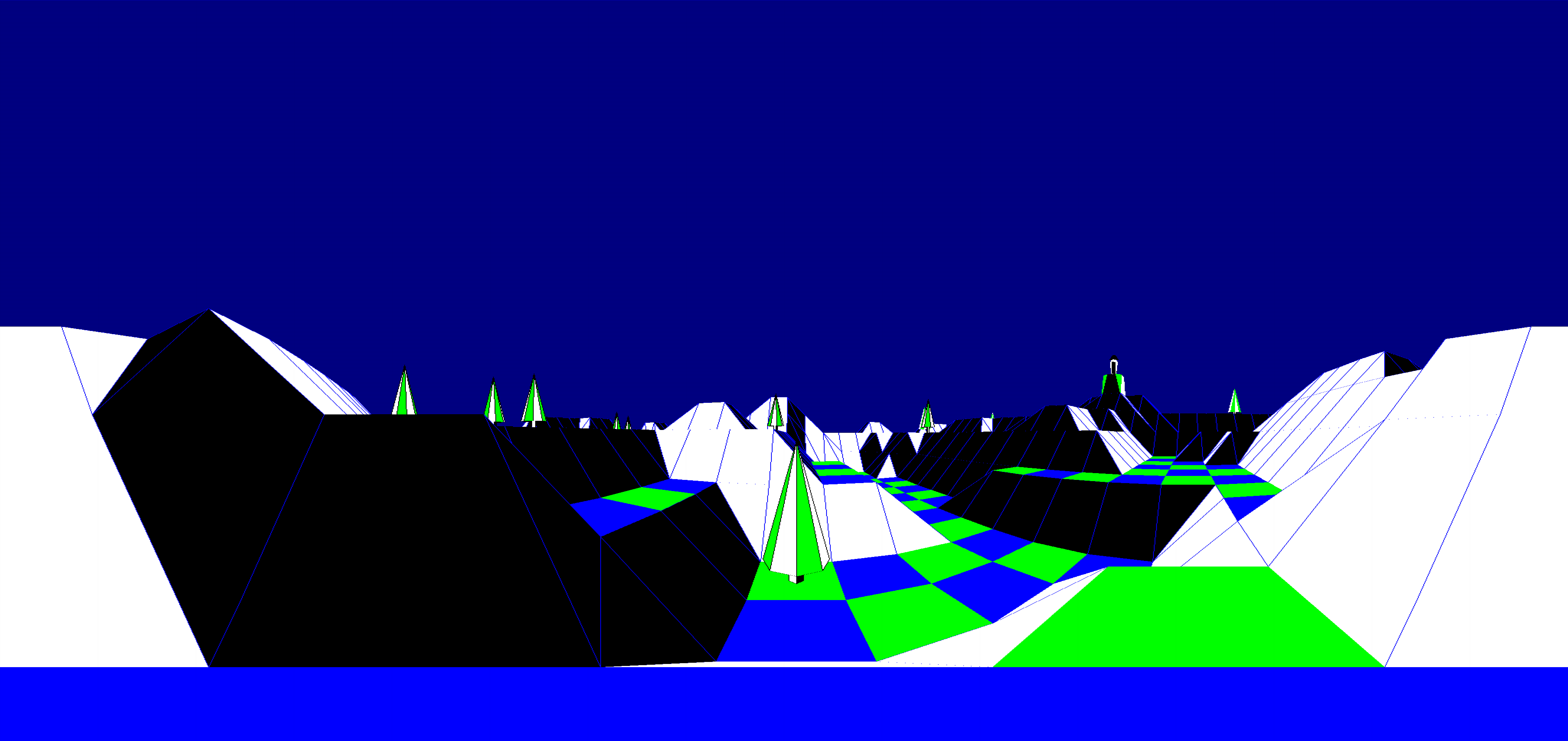
Started looking at the cracker routines and variables, it'd be good to polish them off.
Extract them all into their own subroutines, even when they are inserted into other routines - that way we can actually see the code.
Documented the stashOffset-setting process in SetSecretStash and CheckSecretStash.
Name SetCrackerSeed and CheckCrackerSeed (instead of CheckCrackerTile, which it looks like I guessed previously).
Referring to tilesAtAltitude+14 is not right - it should be stripData+78 as we haven't calculated the altitudes by the point that this is set. That's one of the original 81 random seeds that are ignored... apart from the 79th one.
Extracted another routine, sub_C189D that is involved in all this via the L0C75 variable.
25 November 2025
================
See all the GitHub commits and diffs for 25 November 2025.
Looking at the L0C75 variable now, as it's only used in the anti-cracking code.
Ah! I misread the way that stripData is populated by the GenerateLandscape routine when discarding those 81 seed numbers. It is filled downwards, from stripData+80 down to stripData+0, so the cracker code doesn't use the 79th value from stripData+78, it uses the third value... and that's the high byte of the landscape number, as it's one of the seeds and it passes through the shift register unchanged.
This finally makes sense! And the code that sets L0C75 is working with a BCD number, hence all that stuff about comparing with 9.
Move instruction from just before GetAngleInRadians into its own header, as it's only used for the cracker stuff - rename it to CrackerSeed, as it stores the third seed number.
Document CrackerSeed.
There's some cracker protection code in the middle of sub_C1882 too - it alters the cracker seed, so call it AlterCrackerSeed and document it to finish off the anti-cracker code commentary.
Back to DrawFlatTile.
Looks like L2CE3 is some kind of lookup table .that's indexed by shape, with two tables in one (i.e. L2CE3 and L2CE3 + 16) as sub_C2A5A EORs the index with &10.
So L2CE3 -> tileShapeLookup.
Not sure what this actually contains, but the DrawFlatTile code chooses a different entry (&3C or &00) depending on the position in the chess board, so might this be a tile colour lookup? Don't understand the first entry though (&3C isn't a colour), and the rest are 0, 4 or 8, which aren't colours, so perhaps not.
One for later.
So, thinking about drawing tiles, it feels as if tiles must always either appear as two triangles, or one quadrilateral (when visible).
At least, looking through the list of shapes, this seems to fit.
So let's name some routines, though this is fairly guessy:
This seems to fit the routines, if DrawPolygon draws one face (as a quadrilateral or triangle).
Playing with tileShapeLookup... if I swap the two halves around, the game looks pretty rubbish, but if I swap &04 and &08 and leave the rest along, the game works but with white and black swapped around.
And if I swap &04 and &00 around, black and blue swap around.
This must be some kind of colour table, though I still don't understand the format (or the &3C entry), so:
Maybe it's colour number * 4, so 0, 1, 2 -> &00, &04, &08 ???
26 November 2025
================
See all the GitHub commits and diffs for 26 November 2025.
Add documentation to DrawOneFaceTile, DrawSlopingTile, DrawTwoFaceTile where possible.
A fair few unknown variables, and I don't understand the algorithm for working out the face colours dependent on the viewer's orientation, but at least I understand what it's supposed to do, so that will do for now.
Looking at DrawPolygon, I'm pretty sure that xVectorBot and yVectorBot are being reused for different purposes in the polygon routines, so rename them back to L002C and L002D in those routines, as I think they are a distraction with the vector names (I might be wrong).
They look valid in sub_C1CAA though, but that routine isn't in the polygon hierarchy, so leave them alone there.
Rename columnCounter -> xTileToDraw for when we are tile drawing, as it is clearer (but don't rename for FillScreen, where columnCounter makes sense).
DrawPolygon seems to do the drawing in this bit:
  JSR sub_C2D36
  BCS poly1
  JSR sub_C2299
So sub_C2D36 returns the C flag and sub_C2299 may or may not be called depending on the result.
This seems to do the actual drawing of the polygon, but what is it?
Also, L0010 controls whether this code is run once or twice, as do L002C and L002D.
sub_C295D flips bit 0 of L0010, and sets a bunch of variables in sub_C2963 according to the value.
So DrawPolygon sometimes draws one polygon, then flips bit 0 of L0010, and then draws another one.
What is L0010?
In sub_C2299 is it used to fetch values from L2293 and L2296 - these get added to (screenRowAddrHi screenRowAddrLo) and put into (S R), so these must be high/low bytes? Can't see where (S R) is used though.
Rename to L2293Lo L2293Hi, anyway. They contain 0, &60, 0 for Y = 0, 1, 2.
Back to working out what L0010 does.
The only routines that set L0010 are:
- sub_C2963 is called with A = 0, 1 or 2 and sets L0010 to this value.
- sub_C295D flips bit 0 of L0010 and stores it.
These are called as follows:
- ClearScreen sets L0010 = 0.
- MainGameLoop sets L0010 = 2 at game4.
- sub_C3908 sets L0010 = 0 (part of the panning routine at sub_C10B7).
- sub_C391E sets L0010 = 2 (part of the panning hierarchy under sub_C10B7).
- sub_C2997 sets L0010 = 2 (part of the ProcessGameplay hierarchy).
- DrawPolygon sometimes flips bit 0 between drawing polygons.
And L0010 is used as follows:
Can we flip L0010 between 2 and 3 as well as 0 and 1? Don't think so, as the lookup tables only contain 3 bytes, but can't prove this.
But it looks like L0010 = 0 and 1 are related and flippable, 2 is not flippable.
L0010 is clearly something to do with setting screen addresses and variables for drawing.
It feels as if it might be something to do with the screen buffers, but there are four of them, not three, so maybe not?
Might have to come back to this, getting a bit bogged down by unknowns!
Not sure why I didn't rename sub_C10B7 before, as it clearly does the panning, so rename it now to PanLandscapeView.
Looks like tileShapeColour is the colour number shifted left by 2 places, so document the table accordingly.
Not sure why the first entry also has bits 4 and 5 set, but that will come out in the wash no doubt.
DrawPolygon is still a bit of a mystery, so will have to come back to it when I know more about all these variables. Time to move on to something else, as I'm hitting a brick wall and it's screwing up the momentum...
Ah, it happens sometimes!
Let's see if we can get any further with GetTileAltitude, as we stalled on that for tiles that contain objects and when bit 7 of considerObjects is set, as we don't know what xCoord etc. contain.
It is only called once with bit 7 of considerObjects set, from here:
sub_C1CCC, where xCoord and zCoord might be tile coordinates - they contain the viewing object plus a vector (added in sub_C1CAA), so this could be a gaze routine of some kind? Might not be from player, might be a gaze from any object - i.e. from the viewingObject.
All other calls seem to be with bit 7 clear, which just fetches the tile altitude.
considerObjects also has bit 6 set/cleared/checked. It is only set in GetTileAltitude in data6, though I guess LSR is used to move bit 7 into bit 6 as well. Hmm, probably need to revisit this variable too.
A quick look at sub_C1CCC, then. I wondered before whether this routine calculated some kind of gaze vector, as it's called from ProcessActionKeys with the vector from the player's eyes to the sights and viewingObject set to the player.
It quickly calls sub_C1CAA, which is quite an easy routine - it adds a vector to a coordinate, so rename it as follows:
and document. Hooray, some code that is easy to follow! Woo-hoo!
Back to sub_C1CCC, and yes, this looks like it's doing the usual trick of adding a vector to a point and working out if it hits something - not unlike the tile visibility routine in GetRowVisibility.
That part is straightforward, but it then analyses the tile shape to work out whether the gaze hits a slope, and that's getting quite involved! Time to split it up into smaller parts, I think.
And rename sub_C1CCC -> FollowGazeVector.
27 November 2025
================
See all the GitHub commits and diffs for 27 November 2025.
Finished documenting FollowGazeVector.
Split up even more, into five parts, as it's properly complicated! But it is all just vector maths, so we got there in the end.
Though there's quite a bit of bonkers maths to work out the kind of shape for each tile, so this might be worth further investigation - for example, do the bits in the tile number represent anything about the shape?
Something for later, anyway - it's done!
I had to look and see whether the last two bits of the tile shape number say anything about the tile shape.
They sort-of do, but 2 and 11 don't seem to fit (they would if they were swapped).
  \   0, 4, 8, 12 = special cases (0 = flat, 4/12 = one flat edge, 8 = unused)
  %xxxxxx00 = 00   a1   1a  11   ab
              00   b1   1b  ab   11

  \   1, 5, 9, 13 = one-face tile
  %xxxxxx01 = 00   11   10   01
              11   00   10   01

  \   2, 6, 10, 14 = two-face tile with one high corner, except for 2
  %xxxxxx10 = 11   10   01   00
              01   00   00   01

  \   3, 7, 11, 15 = two-face tile with one high corner, except for 11
  %xxxxxx11 = 10   11   00   01
              11   10   10   11
So the bits don't appear to categorise the tiles into groups, though they are very close; I wonder why 2 and 11 are that way around.
(I've double-checked GetTileShape, and those two do look correct).
The only piece missing is to finish off GetTileAltitude.
Another bit of commentary added today - getting there slowly... but not quite finished.
30 November 2025
================
See all the GitHub commits and diffs for 30 November 2025.
Finished documenting GetTileAltitude, which sets some flags depending on whether the tile contains a tree that can be seen by the gaze vector.
Looks like GetTileAltitude is only called with considerObjects set when we are following the gaze vector - worth remembering.
1 December 2025
===============
See all the GitHub commits and diffs for 1 December 2025.
Now to document PanLandscapeView.
It's straightforward apart from the panning angles in panAngles, which confused me before.
I think I get it now.
This routine pans the view so that when it's drawn, the new portion is always at the top/left edge of the drawn view, and that's the part that is put into the screen buffer (it's clipped to the buffer size when the lines are actually drawn).
So the values in panAngles are set up to ensure left edge of screen is correctly aligned for drawing the slither that we need for the buffer.
Moving right is +20 so that on a pan, we move the view right so that the new left edge of screen is aligned with the part that was just to the right of the screen before we moved (as 20 is the screen width).
Height, ditto, where -12 is added for panning down, so the strip below the bottom of the screen is drawn, and then the pitch angle is adjusted to -4.
To make this clearer, rename panAngles -> panAngleToUpdate.
That said, PanLandscapeView calls sub_C391E, sub_C3908 and sub_C3923 to set variables, so those need looking at.
>>> I have now broken through the 65% barrier <<<